Unreal Engine 5 · Blueprint → C++
Break Vector in Unreal Engine 5 C++
The Blueprint Break Vector node splits an FVector into its X, Y and Z floats. In C++ you read those components directly as public members: ExampleVector.X, ExampleVector.Y and ExampleVector.Z.
Blueprint node & C++ equivalent
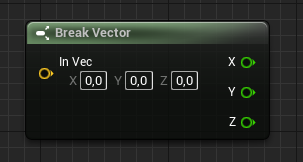
FVector ExampleVector;

ExampleVector.X;     // X
ExampleVector.Y;     // Y
ExampleVector.Z;     // Z
What does the Break Vector node do?
Break Vector takes a single vector and exposes its three scalar components separately. An FVector in Unreal Engine 5 is a struct with public X, Y and Z fields, so there is no function call involved at all.
Because the components are plain public members, you read them directly. This makes Break Vector one of the cheapest operations to translate from Blueprint to C++.
The C++ equivalent
Given an FVector ExampleVector, you access ExampleVector.X, ExampleVector.Y and ExampleVector.Z to get each axis as a float (double precision in UE5's large world coordinates). No UKismetMathLibrary call is needed.
You can store them in local variables, pass them to other functions, or use them inline in expressions exactly as the Blueprint pins would feed downstream nodes.
Frequently asked questions
How do I get the X Y Z of an FVector in C++?+
Read the public members directly: MyVector.X, MyVector.Y and MyVector.Z. They are double-precision floats in UE5.
Is there a Break Vector function in UE5 C++?+
No dedicated function is required. The Blueprint Break Vector node maps to direct member access on the FVector struct.