Unreal Engine 5 · Blueprint → C++
FInterp To in Unreal Engine 5 C++
The Blueprint FInterp To node eases a float toward a target over time. In C++ call FMath::FInterpTo(Current, Target, DeltaTime, InterpSpeed).
Blueprint node & C++ equivalent
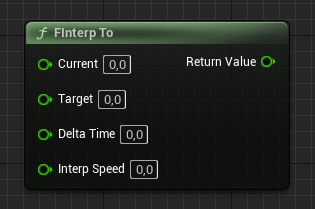
float Current;
float Target;
float DeltaTime;
float InterpSpeed;

float Result = FMath::FInterpTo(Current, Target, DeltaTime, InterpSpeed);
What does the FInterp To node do?
FInterp To moves a current float value toward a target value at a rate controlled by InterpSpeed, scaled by DeltaTime so the motion is frame-rate independent. It produces smooth, decelerating interpolation that slows as it approaches the target.
How to use it in C++
Call FMath::FInterpTo(Current, Target, DeltaTime, InterpSpeed) from Tick, feeding the result back into Current each frame. Pass the frame's DeltaTime so the speed stays consistent across hardware.
An InterpSpeed of 0 returns the target instantly; higher values reach the target faster. The function is declared in FMath, which is available without extra includes in most gameplay code.
Frequently asked questions
How do I smoothly interpolate a float in UE5 C++?+
Call FMath::FInterpTo(Current, Target, DeltaTime, InterpSpeed) each tick and assign the result back to your current value.
What does InterpSpeed 0 do in FInterpTo?+
An InterpSpeed of 0 snaps directly to the target value with no smoothing.