Unreal Engine 5 · Blueprint → C++
Vector Length in Unreal Engine 5 C++
The Blueprint Vector Length node returns the magnitude of a vector. In C++ call ExampleVector.Size(), which computes the Euclidean length of the FVector.
Blueprint node & C++ equivalent
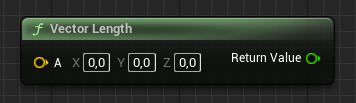
FVector ExampleVector;

ExampleVector.Size();
What does the Vector Length node do?
Vector Length computes the magnitude (Euclidean length) of a vector, the square root of X*X + Y*Y + Z*Z. In Unreal Engine 5 this is the member function FVector::Size().
The C++ equivalent
Call ExampleVector.Size() to get the length as a double. This matches the Vector Length node exactly.
When you only need to compare distances or lengths, prefer ExampleVector.SizeSquared(). It skips the square root, so it is faster, and comparing squared lengths gives the same ordering as comparing actual lengths.
Frequently asked questions
How do I get the length of an FVector in C++?+
Call MyVector.Size(). It returns the magnitude of the vector as a double.
What is the difference between Size and SizeSquared in UE5?+
Size() returns the true length; SizeSquared() returns the length squared without the costly square root. Use the squared version for comparisons.