Unreal Engine 5 · Blueprint → C++
Set Input Mode UI Only in Unreal Engine 5 C++
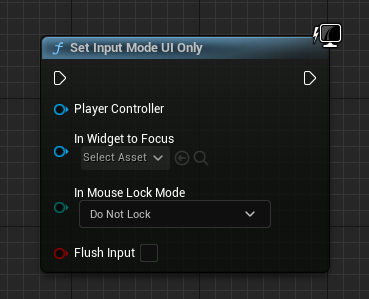
The Set Input Mode UI Only Blueprint node maps to constructing an FInputModeUIOnly struct and passing it to APlayerController::SetInputMode() in C++, sending all input to the UI.
Blueprint node & C++ equivalent
#include "Kismet/GameplayStatics.h"

// Get player controller
APlayerController* PlayerController = UGameplayStatics::GetPlayerController(this, 0);

if (PlayerController)
{
	// Set input mode
	FInputModeUIOnly InputMode;
	PlayerController->SetInputMode(InputMode);
}
What does Set Input Mode UI Only do?
It directs input exclusively to the user interface, ignoring gameplay input from the pawn and controller. This is ideal for menus where only widgets should respond to the mouse and keyboard.
The mouse cursor becomes interactive so the player can click buttons and navigate the UI.
The C++ equivalent
Retrieve the controller via UGameplayStatics::GetPlayerController(this, 0), create an FInputModeUIOnly struct, and call PlayerController->SetInputMode(InputMode). Include Kismet/GameplayStatics.h.
FInputModeUIOnly also exposes SetWidgetToFocus and a lock-mouse option, letting you focus a specific widget and constrain the cursor to the viewport when needed.
Common mistakes
Forgetting to call SetShowMouseCursor(true) is a common issue. UI Only does not always reveal the cursor on its own, so set it explicitly on the controller.
If clicks seem ignored, verify the widget has a focusable, hit-testable element and that you switched back to Game Only when leaving the menu.
Frequently asked questions
How do you set input mode to UI only in UE5 C++?+
Create an FInputModeUIOnly struct and call PlayerController->SetInputMode(InputMode). Get the controller with UGameplayStatics::GetPlayerController(this, 0).
Why is my mouse cursor not showing in UI Only mode?+
FInputModeUIOnly does not force the cursor visible. Call PlayerController->SetShowMouseCursor(true) alongside SetInputMode to display it.