Unreal Engine 5 · Blueprint → C++
For Loop Node in Unreal Engine 5 C++
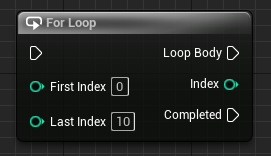
The Blueprint For Loop node is a C++ for loop driven by an int32 index. It runs the loop body once for each value between the start and end index inclusive.
Blueprint node & C++ equivalent
for (int32 i = 0; i <= 10; i++)
{
	// Loop Body...
}
What does the For Loop node do?
The For Loop node runs its Loop Body output once for every integer from First Index to Last Index inclusive, exposing the current Index value on each iteration.
In C++ this is a classic counter loop. Unreal uses int32 rather than the plain int type for its fixed 32-bit width across platforms.
The C++ equivalent
Use for (int32 i = 0; i <= 10; i++). The initializer sets the First Index, the condition i <= 10 matches the Blueprint node's inclusive Last Index, and i++ advances the counter each pass.
The variable i is the equivalent of the Blueprint For Loop's Index output pin, available throughout the loop body.
When to use it
Reach for a counter for loop when you need the numeric index, for example to access array elements by position or to repeat an action a fixed number of times. If you only need the elements themselves, a range-based For Each loop is cleaner.
Frequently asked questions
Why use int32 instead of int in a UE5 for loop?+
Unreal defines int32 as a guaranteed 32-bit signed integer for consistent behavior across all platforms, so it is the standard counter type in Unreal C++.
Is the For Loop node inclusive of the last index?+
Yes. The Blueprint For Loop runs through the Last Index inclusive, which is why the C++ condition uses i <= 10 rather than i < 10.