Unreal Engine 5 · Blueprint → C++
While Loop Node in Unreal Engine 5 C++
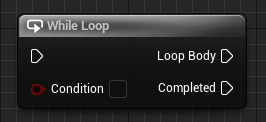
The Blueprint While Loop node is a standard C++ while loop. It repeats the loop body for as long as its bool condition stays true.
Blueprint node & C++ equivalent
bool ExampleCondition;

while (ExampleCondition)
{
	// Loop Body...
}
What does the While Loop node do?
The While Loop node runs its Loop Body repeatedly while the Condition pin remains true, re-checking the condition before each pass. Once the condition becomes false, execution continues to the Completed pin.
In C++ this is the while keyword evaluating a bool before every iteration.
The C++ equivalent
Write while (ExampleCondition) and place the repeated logic inside the braces. The condition is tested before each iteration, so the body may run zero times if the condition is false to begin with.
Make sure something inside the loop eventually changes the condition to false, otherwise the loop never exits.
Common mistakes
The most common error is an infinite loop. In Blueprints an unbounded While Loop can hang the editor, and in C++ it will block the game thread. Always ensure the bool condition is updated inside the loop so it can become false.
Frequently asked questions
What is the C++ equivalent of the While Loop node in UE5?+
It is a C++ while loop: while (ExampleCondition). The body runs as long as the boolean condition stays true.
How do I avoid an infinite while loop in Unreal C++?+
Ensure a statement inside the loop eventually sets the condition to false, otherwise the while loop never terminates and blocks the game thread.