Unreal Engine 5 · Blueprint → C++
Find Look at Rotation in Unreal Engine 5 C++
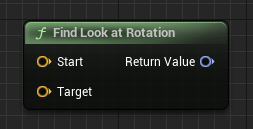
The Blueprint Find Look at Rotation node returns the rotation that points from one location to another. In C++ call UKismetMathLibrary::FindLookAtRotation(Start, Target) after including Kismet/KismetMathLibrary.h.
Blueprint node & C++ equivalent
#include "Kismet/KismetMathLibrary.h"

FVector Start;
FVector Target;

FRotator Result = UKismetMathLibrary::FindLookAtRotation(Start, Target);
What does the Find Look at Rotation node do?
Find Look at Rotation computes an FRotator whose forward direction points from a Start location toward a Target location. It is the standard way to make one actor face another, for aiming, AI orientation, or camera framing.
How to use it in C++
Include Kismet/KismetMathLibrary.h, then call UKismetMathLibrary::FindLookAtRotation(Start, Target) with two FVector world positions. It returns the FRotator you can apply directly with SetActorRotation.
Under the hood this builds a rotation from the direction vector (Target - Start). You can combine it with FMath::RInterpTo to turn smoothly toward the target rather than snapping instantly.
Frequently asked questions
How do I make an actor face another actor in UE5 C++?+
Call UKismetMathLibrary::FindLookAtRotation(MyLocation, TargetLocation) and apply the returned FRotator with SetActorRotation.
What header do I include for FindLookAtRotation?+
Include Kismet/KismetMathLibrary.h to access UKismetMathLibrary::FindLookAtRotation.