Unreal Engine 5 · Blueprint → C++
RInterp To in Unreal Engine 5 C++
The Blueprint RInterp To node eases an FRotator toward a target rotation over time. In C++ call FMath::RInterpTo(Current, Target, DeltaTime, InterpSpeed).
Blueprint node & C++ equivalent
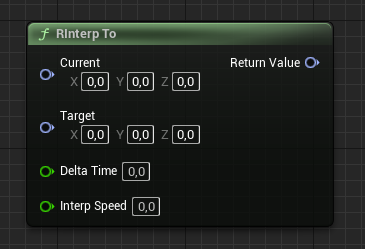
FRotator Current;
FRotator Target;
float DeltaTime;
float InterpSpeed;

FRotator Result = FMath::RInterpTo(Current, Target, DeltaTime, InterpSpeed);
What does the RInterp To node do?
RInterp To smoothly rotates from a current FRotator toward a target FRotator. It correctly handles angle wrapping, taking the shortest path around the 360-degree boundary, which is why you should use it rather than interpolating Pitch/Yaw/Roll by hand.
How to use it in C++
Call FMath::RInterpTo(Current, Target, DeltaTime, InterpSpeed) each frame, assigning the returned FRotator back into your current rotation. This is ideal for turning a character or camera smoothly toward a direction.
Pair it with UKismetMathLibrary::FindLookAtRotation to compute the target rotation that points at another actor, then ease toward it with RInterpTo.
Frequently asked questions
How do I smoothly rotate toward a target in UE5 C++?+
Call FMath::RInterpTo(Current, Target, DeltaTime, InterpSpeed) each tick and assign the result back to your current rotator.
Does RInterpTo handle angle wrapping?+
Yes. RInterpTo takes the shortest rotational path, so it correctly interpolates across the 360-degree boundary.