Unreal Engine 5 · Blueprint → C++
Event BeginPlay in Unreal Engine 5 C++
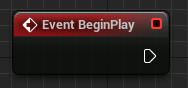
The Blueprint Event BeginPlay node maps to the virtual BeginPlay() function in C++. You override it in your actor class and call Super::BeginPlay() before running your own initialization logic.
Blueprint node & C++ equivalent
protected:
virtual void BeginPlay() override;void AExampleActor::BeginPlay()
{
Super::BeginPlay();
// Your code here...
}What does the Event BeginPlay node do?
Event BeginPlay fires once when an actor enters play, after it has been spawned and initialized but before the first frame of gameplay logic runs. It is the standard place to set up references, start timers, bind delegates, or apply runtime state that depends on the world being fully loaded.
In Blueprint it appears as a red execution event node. In C++ the same callback is the virtual BeginPlay() function inherited from AActor.
The C++ equivalent
Declare virtual void BeginPlay() override; in your header, typically under protected, then define it in the .cpp file. The first line of the body should be Super::BeginPlay(); so the base AActor implementation runs and the engine marks the actor as having begun play.
Skipping the Super::BeginPlay() call can break component initialization and any base-class behavior that relies on it, so keep it as the first statement.
When to use it in C++
Use BeginPlay() for one-time setup that needs the world and other actors to exist, rather than the constructor, which runs at object construction including in the editor. Logic that must run every frame belongs in Tick() instead.
Frequently asked questions
Do I have to call Super::BeginPlay() in C++?+
Yes. Call Super::BeginPlay() as the first line of your override so the base AActor logic, including component BeginPlay calls, executes correctly.
Where should I put initialization, the constructor or BeginPlay?+
Use BeginPlay() for runtime setup that depends on the world and other actors. Use the constructor only for setting defaults and creating components.