Unreal Engine 5 · Blueprint → C++
Set Actor Hidden In Game in Unreal Engine 5 C++
The Blueprint Set Actor Hidden In Game node maps to SetActorHiddenInGame(bool bNewHidden) in C++. Pass true to hide the actor at runtime or false to show it.
Blueprint node & C++ equivalent
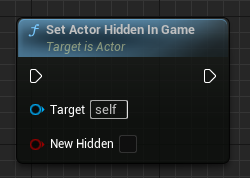
AActor* ExampleActor;

bool bHideActor;

ExampleActor->SetActorHiddenInGame(bHideActor);
What does the Set Actor Hidden In Game node do?
Set Actor Hidden In Game toggles whether an actor is rendered during gameplay without destroying it. Hiding affects visibility, not collision or ticking, so a hidden actor can still block movement and run logic. In C++ this is AActor::SetActorHiddenInGame.
How to use it in C++
With an AActor* ExampleActor and a bool bHideActor, call ExampleActor->SetActorHiddenInGame(bHideActor);. Passing true hides the actor and its components from rendering; passing false makes it visible again. The change is purely visual unless you also adjust collision separately.
Frequently asked questions
Does SetActorHiddenInGame disable collision in UE5?+
No. It only affects rendering. The actor stays collidable and continues to tick unless you change those separately with SetActorEnableCollision or by stopping the tick.
How do I hide an actor in Unreal Engine 5 C++?+
Call SetActorHiddenInGame(true) on the actor pointer to hide it, and SetActorHiddenInGame(false) to show it again.