Unreal Engine 5 · Blueprint → C++
Set Actor Scale 3D in Unreal Engine 5 C++
The Blueprint Set Actor Scale 3D node maps to SetActorScale3D(FVector NewScale3D) in C++. Pass an FVector where each component scales the actor along its X, Y, and Z axes.
Blueprint node & C++ equivalent
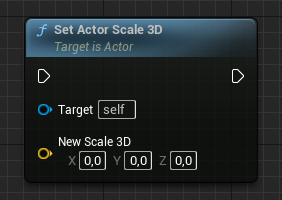
AActor* ExampleActor;

FVector NewScale3D;

ExampleActor->SetActorScale3D(NewScale3D);
What does the Set Actor Scale 3D node do?
Set Actor Scale 3D sets the absolute world scale of an actor. Each FVector component is a multiplier: a value of 1 keeps the original size on that axis, 2 doubles it, and 0.5 halves it. In C++ this is AActor::SetActorScale3D.
How to use it in C++
Declare an FVector NewScale3D with your desired multipliers and call ExampleActor->SetActorScale3D(NewScale3D);. This sets the world scale directly rather than multiplying the existing scale. Uniform scaling uses the same value on all three axes, for example FVector(2.f).
Frequently asked questions
What is the C++ equivalent of Set Actor Scale 3D in UE5?+
It is AActor::SetActorScale3D(FVector NewScale3D). Each FVector component multiplies the actor's size along that axis.
How do I uniformly scale an actor in C++?+
Pass an FVector with equal components, such as FVector(2.f), to SetActorScale3D to double the size evenly on all three axes.