Unreal Engine 5 · Blueprint → C++
Line Trace By Channel in Unreal Engine 5 C++
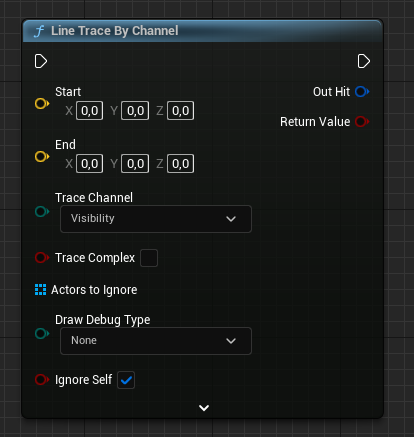
Line Trace By Channel maps to GetWorld()->LineTraceSingleByChannel, which returns a bool and writes the first blocking hit into an FHitResult.
Blueprint node & C++ equivalent
FVector Start;
FVector End;

// Results will be stored here
FHitResult HitResult;

bool bHit = GetWorld()->LineTraceSingleByChannel(
	HitResult,                                   // Hit result
	Start,                                       // Start of the trace
	End,                                         // End of the trace
	ECollisionChannel::ECC_Visibility            // Trace channel
);
The C++ equivalent
Call LineTraceSingleByChannel on the world returned by GetWorld(). It takes an out FHitResult, the Start and End FVector points, and a trace channel such as ECollisionChannel::ECC_Visibility. The function returns true if the trace hit a blocking object.
How to use it in C++
Declare an FHitResult HitResult before the call so the function can populate it. After the trace, inspect HitResult.GetActor(), HitResult.ImpactPoint, and HitResult.ImpactNormal to react to the hit. Only read these fields when the returned bool is true.
When to use it
Use the single-hit version when you only care about the first blocking surface, such as aiming weapons, interaction probes, or ground checks. For all overlapping hits along the line, use LineTraceMultiByChannel instead. You can pass an FCollisionQueryParams to ignore the calling actor.
Frequently asked questions
How do I do a line trace in UE5 C++?+
Call GetWorld()->LineTraceSingleByChannel(HitResult, Start, End, ECollisionChannel::ECC_Visibility). It returns true on a blocking hit and fills the FHitResult.
What is ECC_Visibility in a line trace?+
ECC_Visibility is a built-in collision channel used for general visibility queries. Pass it as the trace channel to test against objects that block the Visibility channel.