Unreal Engine 5 · Blueprint → C++
Print String in Unreal Engine 5 C++
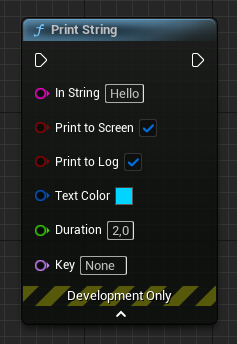
The Print String Blueprint node maps to UKismetSystemLibrary::PrintString in C++, or to the lower-level GEngine->AddOnScreenDebugMessage when you only need an on-screen message.
Blueprint node & C++ equivalent
if (GEngine)
{
	GEngine->AddOnScreenDebugMessage(
		-1,                        // Key
		2.0f,                      // Duration
		FColor::Cyan,              // Color
		"Hello"                    // Message
	);
}#include "Kismet/KismetSystemLibrary.h"
UKismetSystemLibrary::PrintString(
this, // World context object
"Hello", // Message
true, // Print to screen?
true, // Print to console?
FLinearColor(0.0f, 0.66f, 1.0f, 1.0f), // Color
2.0f // Duration
);What does the Print String node do?
Print String writes a message to the screen and to the output log for quick debugging. It is one of the first nodes most developers use to confirm that a branch of logic actually runs.
The C++ equivalent
The direct equivalent is UKismetSystemLibrary::PrintString, which lives in Kismet/KismetSystemLibrary.h. It takes a world context object, the message string, booleans for printing to screen and console, an FLinearColor, and a duration in seconds. This mirrors the Blueprint pin layout exactly.
If you only need an on-screen message, you can call GEngine->AddOnScreenDebugMessage directly. Pass a Key of -1 to always add a new line, a duration, an FColor, and the message. Always null-check GEngine first, since it can be null outside of a running world.
When to use it
Use PrintString for parity with Blueprint behavior, including console logging and color control. Reach for AddOnScreenDebugMessage in engine-level or editor code where you do not have a convenient world context object. For production logging prefer UE_LOG, since on-screen prints are stripped in shipping builds.
Frequently asked questions
What is the C++ version of Print String in UE5?+
It is UKismetSystemLibrary::PrintString, declared in Kismet/KismetSystemLibrary.h. It accepts the same world context, message, screen/console flags, color and duration parameters as the Blueprint node.
Why is my AddOnScreenDebugMessage not showing?+
Check that GEngine is valid and that the duration is greater than zero. On-screen debug messages also require a running game world, and they do not appear in shipping builds where the debug rendering is compiled out.