Unreal Engine 5 · Blueprint → C++
Multi Line Trace By Channel in Unreal Engine 5 C++
Multi Line Trace By Channel maps to GetWorld()->LineTraceMultiByChannel, which fills a TArray<FHitResult> with every object the line crosses up to the first blocking hit.
Blueprint node & C++ equivalent
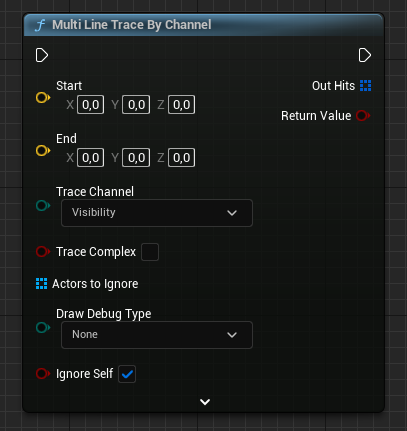
FVector Start;
FVector End;

// Results will be stored here
TArray<FHitResult> HitResults;

bool bHit = GetWorld()->LineTraceMultiByChannel(
	HitResults,                                  // Hit results
	Start,                                       // Start of the trace
	End,                                         // End of the trace
	ECollisionChannel::ECC_Visibility            // Trace channel
);
The C++ equivalent
Call LineTraceMultiByChannel on GetWorld(). Instead of a single FHitResult, it takes a TArray<FHitResult> out parameter so it can record multiple overlapping hits. The remaining arguments, Start, End, and the trace channel like ECC_Visibility, are identical to the single-hit version.
How to use it in C++
Declare TArray<FHitResult> HitResults and pass it by reference. After the call, iterate over the array to process each hit. The function returns true if at least one blocking hit was found, and the array is ordered from the start of the trace toward the end.
Single vs multi trace
Multi traces report every overlapping object plus the final blocking object, which makes them ideal for piercing projectiles, area scans, or counting actors along a ray. If you only need the closest blocking surface, LineTraceSingleByChannel is cheaper.
Frequently asked questions
How do I trace multiple actors with one line trace in UE5?+
Use GetWorld()->LineTraceMultiByChannel(HitResults, Start, End, ECollisionChannel::ECC_Visibility) with a TArray<FHitResult>. It records every hit along the line.
What is the difference between LineTraceSingle and LineTraceMulti?+
Single returns only the first blocking hit in one FHitResult, while Multi returns all overlapping hits up to the first blocker in a TArray<FHitResult>.