Unreal Engine 5 · Blueprint → C++
Deproject Screen to World in Unreal Engine 5 C++
Deproject Screen to World is UGameplayStatics::DeprojectScreenToWorld(), converting a 2D screen point into a world-space position and direction for tracing.
Blueprint node & C++ equivalent
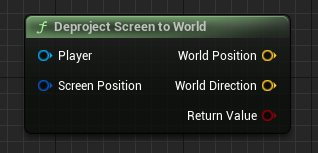
#include "Kismet/GameplayStatics.h"

// Get player controller
APlayerController* PlayerController = UGameplayStatics::GetPlayerController(this, 0);

FVector2D ScreenPosition;

// Result is stored in these vectors
FVector WorldPosition;
FVector WorldDirection;

UGameplayStatics::DeprojectScreenToWorld(
	PlayerController,                  // Target player
	ScreenPosition,                    // Screen position
	WorldPosition,                     // (Output) World position
	WorldDirection                     // (Output) World direction
);
What does Deproject Screen to World do?
This node reverses projection: it takes a 2D screen coordinate (such as the mouse cursor) and computes the corresponding 3D world position and the direction pointing into the scene. The position and direction together define a ray you can feed into a line trace.
It is the foundation of click-to-move, cursor picking, and aiming where the camera looks.
The C++ equivalent
Get the controller with UGameplayStatics::GetPlayerController(this, 0), then call UGameplayStatics::DeprojectScreenToWorld() with the player controller, the FVector2D screen position, and two FVector output references for the world position and world direction.
Use the returned position as a trace start and Position + Direction * Distance as the trace end. The function is declared in Kismet/GameplayStatics.h.
Frequently asked questions
How do I get a world ray from the mouse in UE5 C++?+
Call UGameplayStatics::DeprojectScreenToWorld() with the cursor's FVector2D position. It outputs a world location and a world direction that form the ray.
What is the difference between project and deproject?+
Project converts a 3D world point to 2D screen space, while deproject converts a 2D screen point back into a 3D world position and direction.