Unreal Engine 5 · Blueprint → C++
Draw Debug Box in Unreal Engine 5 C++
Draw Debug Box maps to the global DrawDebugBox() function, which renders a wireframe box defined by a center and an extent for debugging.
Blueprint node & C++ equivalent
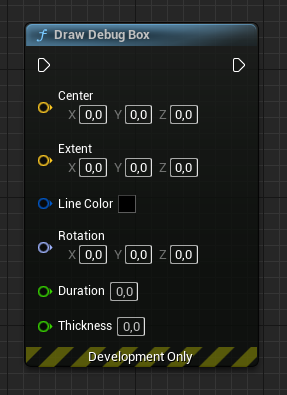
FVector Center;
FVector Extent;

DrawDebugBox(
	GetWorld(),        // World object
	Center,            // Box center
	Extent,            // Box extent
	FColor::Red,       // Box color
	false,             // Persistent?
	5.0f,              // Duration
	0,                 // Depth priority
	1.0f               // Line thickness
);
What does Draw Debug Box do?
Draw Debug Box renders a temporary wireframe box in the world, useful for visualizing collision bounds, trigger volumes, or box-shaped sweep tests. The box is defined by a center point and a half-size extent.
Like other debug shapes it is a development-time aid and is not shown in shipping builds by default.
The C++ equivalent
Call the global DrawDebugBox() function from DrawDebugHelpers.h, passing GetWorld(), the FVector center, the FVector extent (half-dimensions), an FColor such as FColor::Red, a persistent bool, a duration, a depth priority, and the line thickness.
Remember the extent is a half-size, so the rendered box spans twice the extent on each axis.
Frequently asked questions
How do I draw a debug box in UE5 C++?+
Call DrawDebugBox(GetWorld(), Center, Extent, FColor::Red, false, 5.0f, 0, 1.0f) after including DrawDebugHelpers.h.
Is the debug box extent a full size or half size?+
The extent is the half-size of the box, so the drawn box extends from center minus extent to center plus extent on each axis.