Unreal Engine 5 · Blueprint → C++
Quit Game in Unreal Engine 5 C++
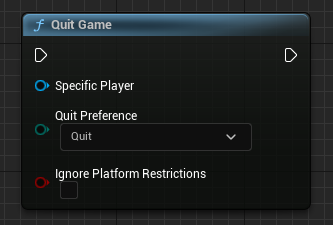
The Quit Game Blueprint node maps to UKismetSystemLibrary::QuitGame() in C++, which takes a world context, the quitting APlayerController, an EQuitPreference value, and a flag to ignore platform restrictions.
Blueprint node & C++ equivalent
#include "Kismet/GameplayStatics.h"
#include "Kismet/KismetSystemLibrary.h"

// Get player controller
APlayerController* PlayerController = UGameplayStatics::GetPlayerController(this, 0);

// Quit game
UKismetSystemLibrary::QuitGame(
	this,                        // World context object
	PlayerController,            // Quitting player controller
	EQuitPreference::Quit,       // Quit preference
	false                        // Ignore platform restrictions?
);
What does the Quit Game node do?
Quit Game shuts down the running game for the specified player. In a packaged build it closes the application; in the editor it stops Play In Editor. The node exposes a Quit Preference (Quit or Background) and an option to ignore platform restrictions that might otherwise block quitting.
The C++ equivalent
Include Kismet/KismetSystemLibrary.h and call UKismetSystemLibrary::QuitGame(). It requires a UWorld context object (pass this), the quitting APlayerController, an EQuitPreference enum value, and a bool for ignoring platform restrictions.
Fetch the controller first with UGameplayStatics::GetPlayerController(this, 0) from Kismet/GameplayStatics.h. Passing EQuitPreference::Quit performs a full shutdown, while EQuitPreference::Background suspends the app on platforms that support it.
When to use it in C++
Use this from menu logic, a quit button handler, or any gameplay code that should end the session. Because it needs a player controller, call it from an actor or object that has access to a valid UWorld.
Frequently asked questions
What is the C++ equivalent of the Quit Game Blueprint node?+
Call UKismetSystemLibrary::QuitGame(this, PlayerController, EQuitPreference::Quit, false) after including Kismet/KismetSystemLibrary.h.
How do I get the player controller for QuitGame in C++?+
Use UGameplayStatics::GetPlayerController(this, 0) to retrieve the first local player's APlayerController and pass it as the quitting controller.
What does EQuitPreference do?+
EQuitPreference::Quit closes the application entirely, while EQuitPreference::Background sends it to the background on platforms that support suspension instead of full exit.