Unreal Engine 5 · Blueprint → C++
Spawn Decal at Location in Unreal Engine 5 C++
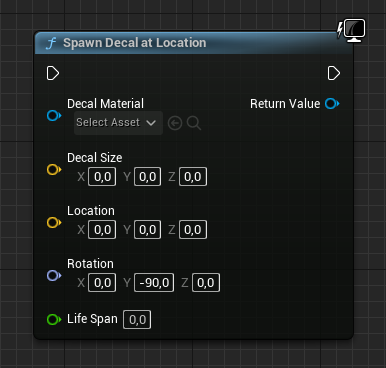
Spawn Decal at Location is UGameplayStatics::SpawnDecalAtLocation(), which creates a UDecalComponent projecting a material onto surfaces at a chosen point.
Blueprint node & C++ equivalent
private:
	// The material needs to be set in blueprint
	UPROPERTY(EditAnywhere, meta = (AllowPrivateAccess = "true"))
UMaterialInterface* ExampleMaterial;#include "Kismet/GameplayStatics.h"
UDecalComponent* SpawnedDecal;
FVector Size;
FVector Location;
FRotator Rotation;
if (ExampleMaterial)
{
SpawnedDecal = UGameplayStatics::SpawnDecalAtLocation(
this, // World context object
ExampleMaterial, // Decal material
Size, // Decal size
Location, // Decal location
Rotation, // Decal rotation
0.0f // Life span (0 = infinite)
);
}What does Spawn Decal at Location do?
This node spawns a decal at a world location, projecting a material onto nearby geometry. It is the go-to approach for bullet holes, scorch marks, blood splatters, and footprints created during gameplay.
The returned UDecalComponent* can be stored to adjust fade or lifetime later.
How to use it in C++
Expose the decal material with a UPROPERTY(EditAnywhere, meta = (AllowPrivateAccess = "true")) of type UMaterialInterface* so it can be assigned in Blueprint. In the .cpp, null-check that material, then call UGameplayStatics::SpawnDecalAtLocation().
Pass the world context object, the material, an FVector size, the FVector location, an FRotator rotation, and a life span where 0.0f means the decal lasts indefinitely. Include Kismet/GameplayStatics.h.
Common mistakes
Forgetting the null-check on the material causes a crash when no material is assigned. Setting the life span to 0 keeps the decal forever, which can accumulate; give transient effects a finite duration to let them auto-clean.
Frequently asked questions
How do I spawn a decal at runtime in UE5 C++?+
Call UGameplayStatics::SpawnDecalAtLocation() with a UMaterialInterface*, size, location, rotation, and life span. It returns a UDecalComponent*.
How do I make a spawned decal disappear after a few seconds?+
Pass a positive life span value instead of 0.0f. A life span of 0 means the decal never expires automatically.