Unreal Engine 5 · Blueprint → C++
Get Game State in Unreal Engine 5 C++
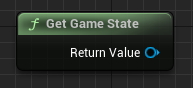
Get Game State maps to UGameplayStatics::GetGameState(this), which returns the replicated AGameStateBase* available on both server and clients.
Blueprint node & C++ equivalent
#include "Kismet/GameplayStatics.h"

AGameStateBase* GameState = UGameplayStatics::GetGameState(this);
What does Get Game State do?
The game state is the replicated container for match-wide data such as the player array, elapsed time, and score. Unlike the game mode, it exists on every machine, making it the right place to read shared state on clients.
The node returns an AGameStateBase*, the base class your own AGameState or AGameStateBase subclass derives from.
The C++ equivalent
After including Kismet/GameplayStatics.h, call AGameStateBase* GameState = UGameplayStatics::GetGameState(this);. Cast the result to your custom game state subclass to read replicated properties you defined with UPROPERTY(Replicated).
Because game state is replicated, it is safe to query from client-side UI and HUD code.
Frequently asked questions
How do I get the game state in C++ in UE5?+
Call UGameplayStatics::GetGameState(this) from Kismet/GameplayStatics.h. It returns an AGameStateBase* that exists on both server and clients.
Should I use game mode or game state for client data?+
Use game state. It is replicated to all clients, while game mode only exists on the server, so shared and client-readable data belongs in game state.