Unreal Engine 5 · Blueprint → C++
Get Game Mode in Unreal Engine 5 C++
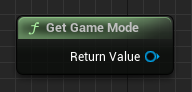
Get Game Mode is UGameplayStatics::GetGameMode(this), returning the active AGameModeBase* for the current world.
Blueprint node & C++ equivalent
#include "Kismet/GameplayStatics.h"

AGameModeBase* GameMode = UGameplayStatics::GetGameMode(this);
What does Get Game Mode return?
The Get Game Mode node returns the running game mode for the current level. Game mode holds match rules, scoring, and spawn logic, and it exists only on the server (authority) in networked games.
In C++ the return type is AGameModeBase*, the base class your own AGameMode or AGameModeBase subclass derives from.
The C++ equivalent
Include Kismet/GameplayStatics.h and call AGameModeBase* GameMode = UGameplayStatics::GetGameMode(this);. The this argument is the world context object used to resolve the correct world.
To access your own rules, cast the result with Cast<AMyGameMode>(GameMode) and null-check before use, since clients will receive nullptr.
Frequently asked questions
How do I get the game mode in UE5 C++?+
Call UGameplayStatics::GetGameMode(this) from Kismet/GameplayStatics.h, which returns an AGameModeBase*. Cast it to your custom game mode class to access its members.
Why is GetGameMode returning null on clients?+
The game mode only exists on the server. On clients GetGameMode returns nullptr, so move game-mode logic to authority-only code or use the game state instead.